
How PeakMetrics Brings Real-Time Narrative Intelligence Into AI Assistants
PeakMetrics narrative intelligence is now available inside AI assistants like ChatGPT and Claude, bringing real-time, permissioned insights directly into your workflows.
Published
The way teams use intelligence is changing. Insights are no longer limited to a single dashboard or platform. They need to be available where work happens, in real-time, and easy to act on.
That’s why PeakMetrics narrative intelligence is now integrated into AI assistants like ChatGPT and Claude. With a new AI integration layer, teams can access, analyze, and summarize PeakMetrics data securely within the AI tools they already use daily.
This represents a significant change in how teams use narrative intelligence: it can now be actively embedded into their workflows, not just reviewed.
What Is an MCP Server?
An MCP server is a standardized way for AI assistants to securely connect to external systems and use their data in real time. Instead of relying only on what an AI was trained on, an MCP server allows the AI to pull live, permissioned information from trusted platforms when it needs context to answer a question or generate analysis.
In the case of PeakMetrics, the MCP server acts as a secure bridge between AI tools and our narrative intelligence platform. When you ask an AI assistant a question, it can query PeakMetrics for the latest narrative signals, trends, and risk indicators, then use that information to produce outputs grounded in what is actually happening online.
The MCP server follows the same security and access rules as the PeakMetrics platform. AI assistants only retrieve data users are authorized to see, ensuring intelligence remains protected while making it far more flexible to use across AI-driven workflows.
What This Actually Means
Behind the scenes, PeakMetrics has built a secure connection that allows AI assistants to interact directly with our data and analytics. It's like PeakMetrics “plugging into” AI tools, similar to how APIs support applications, but here the AI does the work for you.
Instead of logging into PeakMetrics, exporting reports, and pasting them into another tool, your AI assistant can pull insights from PeakMetrics on demand and use them immediately.
You can ask questions like:
- “What emerging narratives are gaining traction around our brand this week?”
- “Is this spike organic or driven by coordinated or bot activity?”
- “Summarize the highest-risk narratives by region and sentiment.”
- “Is there violent rhetoric targeting my CEO?”
- “Who are the top voices pushing the narrative on social media?”
The AI responds using live PeakMetrics data and context, not outdated assumptions or training information.
AI tools are powerful, but they don’t generate insights on their own. Their effectiveness depends on the quality of data they access. Without current, accurate information, AI outputs can sound confident while being wrong. PeakMetrics provides real-time narrative intelligence that gives AI systems the context needed to produce reliable insights for decision-making.
PeakMetrics, Wherever You Work
With this integration, PeakMetrics can be enabled in:
- ChatGPT
- Claude
- Google Gemini
And other AI-enabled productivity tools that support modern AI connections.
Bringing PeakMetrics intelligence into AI workflows significantly broadens what teams can do with narrative insights. Intelligence can be queried, combined with other data, and applied in real-time across planning, response, and decision-making. From automated briefings to proactive risk detection and scenario modeling, the opportunities grow as teams explore how AI and narrative intelligence can work together.
Here’s How It Works:
At a high level, the PeakMetrics MCP connection allows AI assistants to ground their responses in live narrative intelligence. Instead of relying on generic training data, your assistant can securely reference the PeakMetrics workspaces configured in your account, ensuring every output reflects what’s actually happening online in real time.
Step 1: Connect PeakMetrics to your AI assistant
Start by connecting PeakMetrics to your favorite AI assistant. Learn how here. Once connected, the assistant can securely access the workspaces, narrative clusters, Smart Categories, and signals you’ve already configured in your PeakMetrics account.
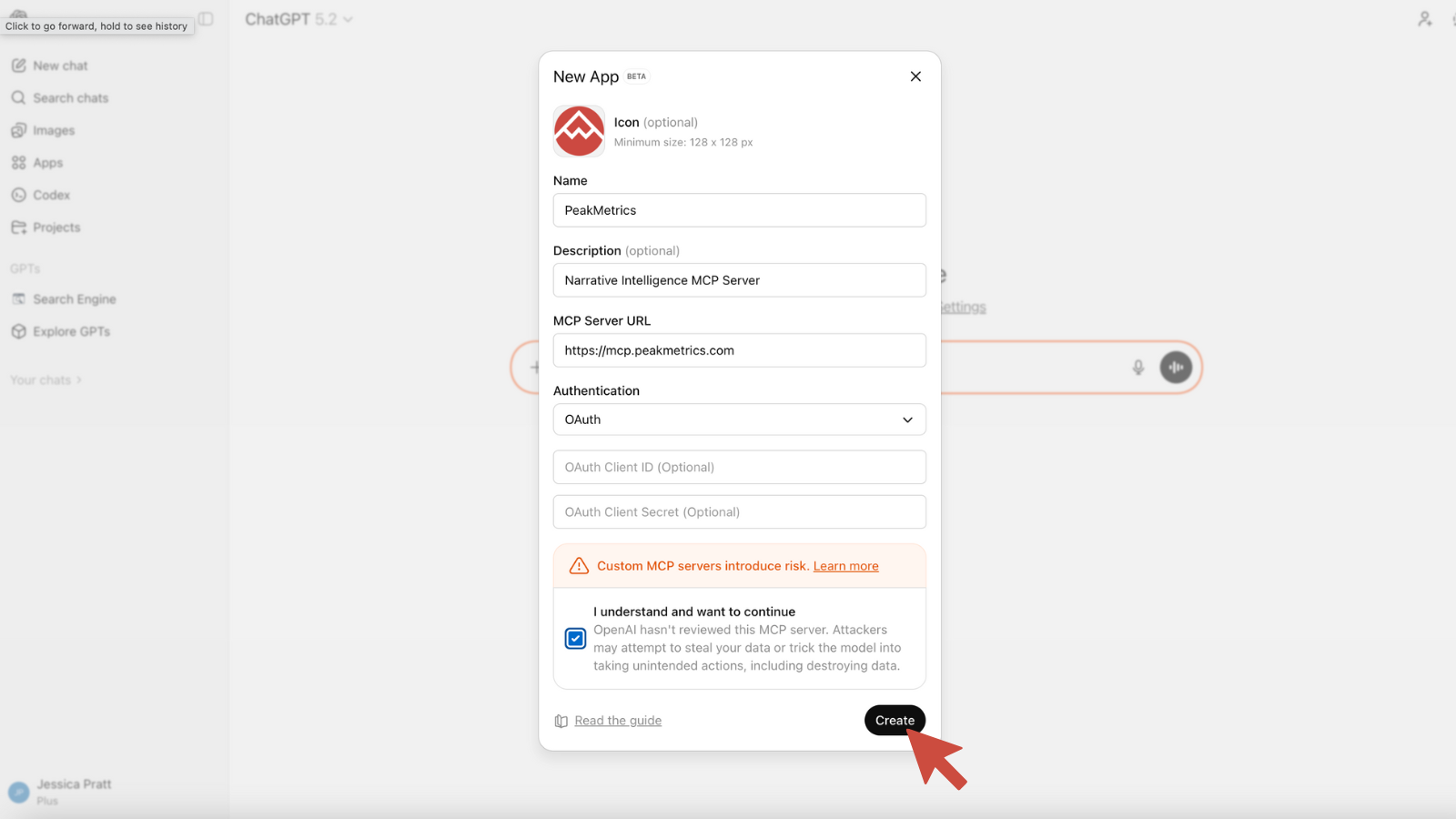
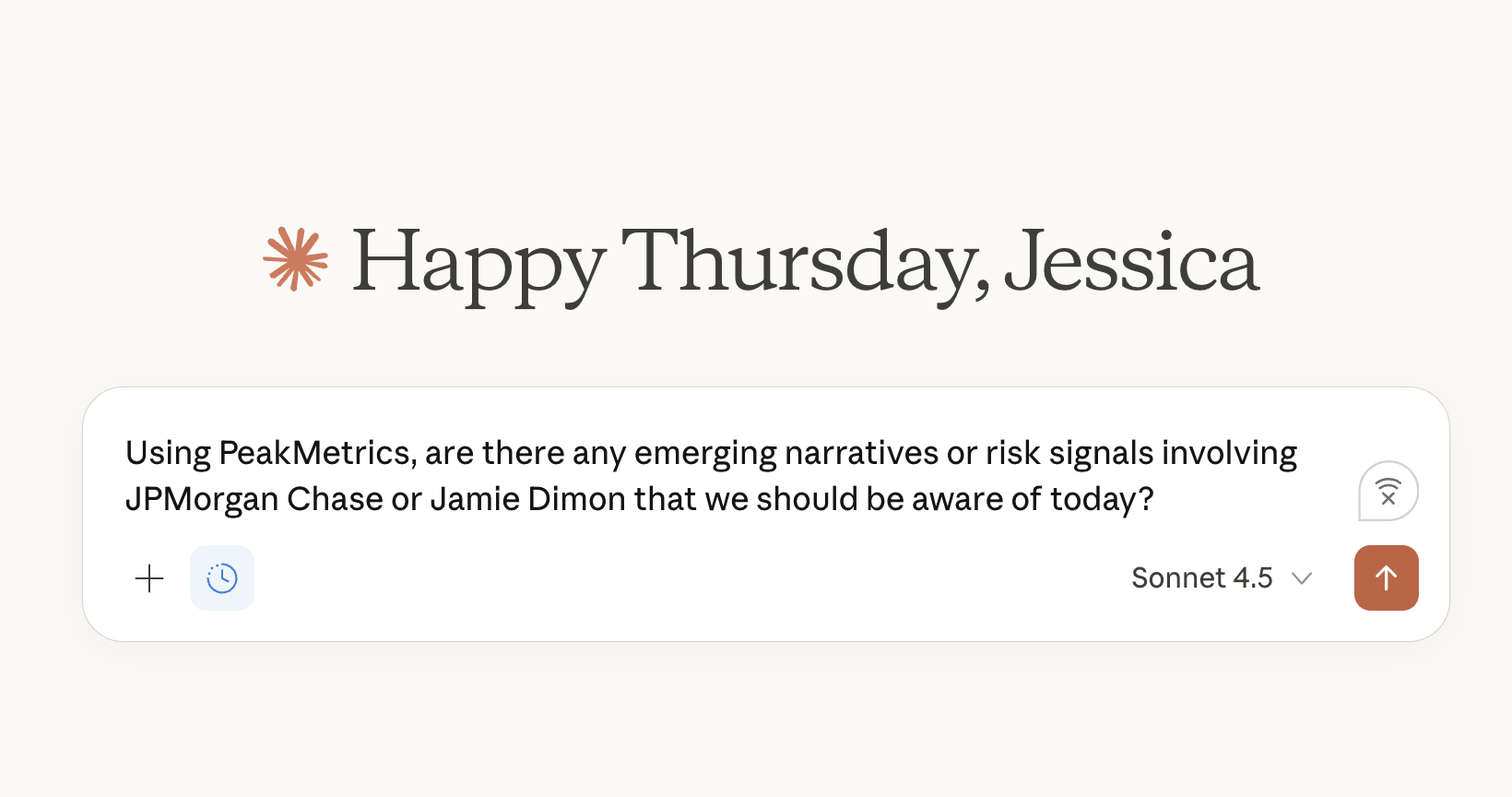
Step 2: Ask a question
After connecting, you can ask a question directly inside the assistant, such as: “Are there any emerging narratives or risk signals involving JPMorgan Chase or Jamie Dimon that we should be aware of today?”
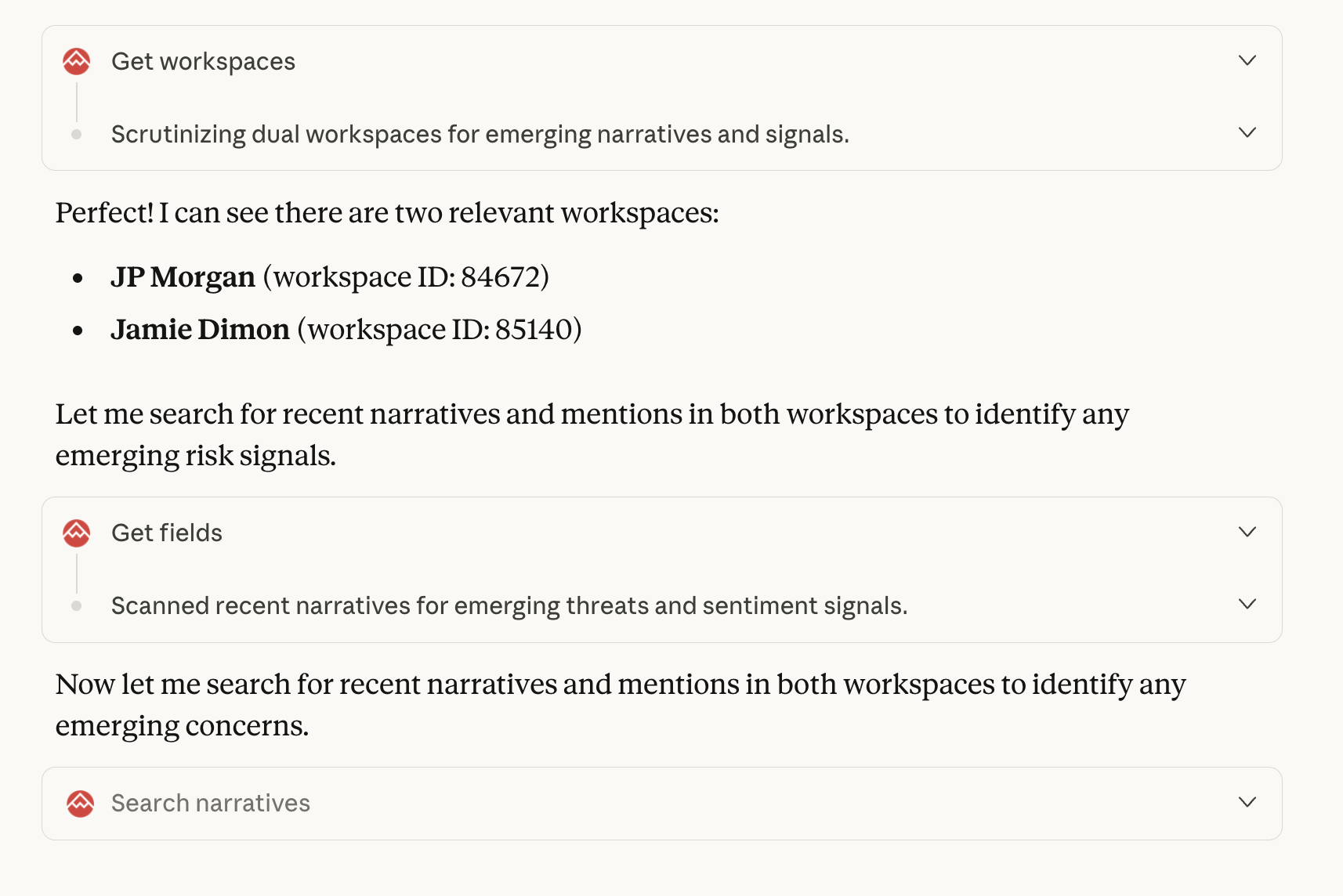
Step 3: PeakMetrics is queried in real time
The assistant sends the request to PeakMetrics, querying the relevant workspaces and live signals tied to JPMorgan and its leadership to understand what narratives are forming, how they’re spreading, and whether any early risk indicators are present.
Step 4: Receive a grounded, real-time output
The assistant returns a response informed by live PeakMetrics data, surfacing active narratives, early warning signals, and meaningful shifts in conversation so teams can quickly understand what matters and decide how to act.

Why This Matters for Teams
Faster Insight, Less Friction: Teams no longer need to copy data between tools or wait for exports. Your AI assistant can fetch the latest narrative intelligence instantly and generate the reports you need.
Always Up to Date: Since the AI pulls data directly from PeakMetrics, responses are based on the most current information available. This is crucial in fast-paced situations where context can shift rapidly.
Permission-Aware and Secure: All existing PeakMetrics permissions still apply. The AI will only access data users are authorized to see, ensuring sensitive information remains protected. This makes the integration safe for enterprise and government use.
Conversational Analytics: Teams no longer have to navigate dashboards. They can ask questions in plain language and receive structured insights or visual outputs within seconds.
Real-World Use Cases
Crisis Communications: Data-Driven Response, Faster
A communications leader can ask their AI assistant to summarize the current narrative around an issue, identify what’s driving momentum, bot activity, key themes, and draft counter-messages based on real data. The response reflects actual sentiment, amplification patterns, and risk signals, avoiding guesswork.
Threat Intelligence and Monitoring
Security and intelligence teams can automate daily or weekly briefings by asking an AI agent to pull the latest narrative risk signals, bot activity, or emerging threats from PeakMetrics and summarize them right away.
Combining PeakMetrics with Internal Data
AI tools can mix PeakMetrics intelligence with internal sources such as sales data, incident logs, or internal reports. This creates richer, more actionable insights that combine external perception and internal reality.
Hands-Free Analysis
AI agents can be set to run analyses within PeakMetrics, like categorizing narratives or identifying surging themes. They then provide a plain-language explanation without manual setup.
The Takeaway
This integration expands how you can use the PeakMetrics intelligence you already trust. By making it available inside AI tools, PeakMetrics becomes something you can combine, layer, and apply alongside other systems, data sources, and workflows in real time.
Instead of narrative intelligence living in one place, it can now be pulled into broader analysis, paired with internal data, used to inform planning, or embedded into automated workflows and decision support. This allows teams to connect what is happening online to what is happening inside their organization in a way that was not possible before.
PeakMetrics becomes the narrative intelligence layer within your AI workflows, ensuring that the decisions you make across tools and teams are informed by the narrative context only PeakMetrics can provide.
To learn more, connect with our team today.
Sign up for our newsletter
Get the latest updates and publishings from the PeakMetrics investigations team.
Loading the newsletter sign-up form…